Stocks Signals - Stock Tracker
- 3.4
- Rating
- 100.00K
- Installs
- Free
- Price
 Analysis by App-foxy
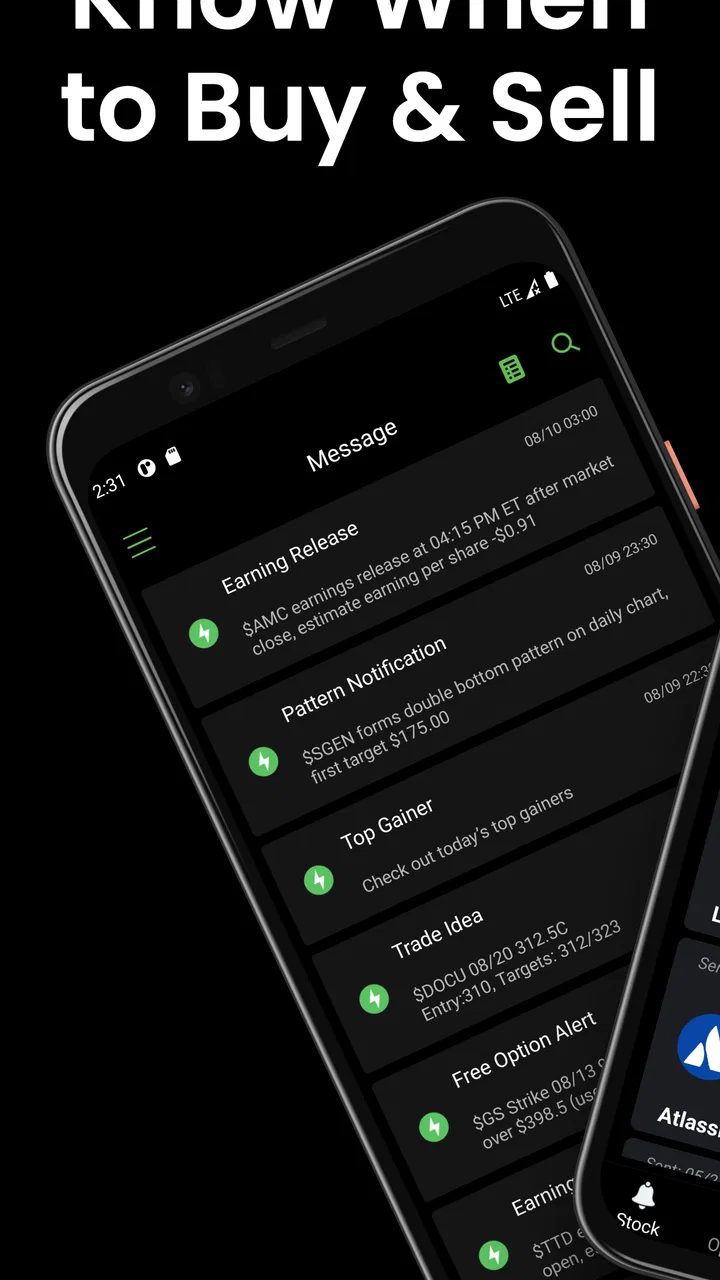
Stocks Signals - Stock Tracker is the kind of finance app I would try when I want a quicker way to organize stock ideas without opening a full desktop platform. It is free to install, aimed at everyone, and built by Stock Screener APP. The main appeal is the combination of stock screening, trading signals, and alerts in one mobile-focused tool. I found that combination useful for narrowing my attention, although it works best as a research companion rather than a replacement for careful financial analysis.
If you are completely new to investing, the app can feel more approachable than a traditional brokerage dashboard because its purpose is easier to understand: look for stocks, inspect signals, and decide what deserves more research. If you already follow markets closely, it may serve as a quick watchlist and discovery tool. In both cases, the important mindset is the same: a signal can help me notice a possibility, but it cannot remove risk or make a decision for me.
What to expect before you start
The app belongs to the finance category, but it is not primarily a place where I would expect to complete every part of an investment journey. Its focus is stock discovery and monitoring. That distinction matters. A brokerage app is designed around accounts, orders, balances, and portfolio management, while Stocks Signals - Stock Tracker is centered on finding and following market opportunities.
You May Also Like

 Blood Strike: 2.5 Anniversary
Blood Strike’s Loadouts Turn Every Drop Into a Tactical Gamble
A close look at Blood Strike’s custom loadouts: how fast access to signature weapons reshapes its battle royale rhythm, rewards preparation, and narrows the gap between fights.

 Pandora - Music & Podcasts
Pandora’s Music Is Easy to Start, but Harder to Recover
Pandora’s strength is its low-effort path from a seed to a station. Its weak spot is how much confidence it asks you to place in connection, setup, and quiet recovery.

 8 Ball Pool
 Is Built on Rivalries, Rematches, and Routine
A close look at the rivalries, rematches, shared routines, and unanswered safety questions that turn a quick pool match into a persistent mobile community.

 Samsung Music
’s Quiet Strength Is Playing What You Already Own
Its reach comes less from spectacle than from dependable access to a personal library. That simplicity is both the app’s strongest retention engine and its ceiling.

 AccuWeather: Weather Radar
AccuWeather Review: A Quick, Clear Forecast for Everyday Decisions
For everyday plans, the best forecast is the one you can understand quickly. AccuWeather makes rain timing, radar, and local conditions easy to act on, with a few trade-offs.

 Hill Climb Racing
Why Hill Climb Racing Still Turns Crashes Into One More Run
A tiny car, a bumpy hill and one more upgrade: Hill Climb Racing keeps resurfacing because its simple chaos makes every near-miss feel personal.
More From Our News Desk



That makes it especially suitable for a first pass through the market. Instead of beginning with a long list of company names, I can use the screener to reduce the field and then inspect the stocks that match the conditions I care about. The signal feature adds another layer by drawing attention to possible trading setups. I would still verify the company, understand the broader market context, and check current information elsewhere before committing money.
The app has reached a 3.4 average from around 414 ratings, with roughly 82 written reviews and over 100 thousand installs. Those figures suggest a product with a real user base but also a mixed experience. I think that is a fair expectation to carry into the first session: the concept is useful, yet the quality of the experience may depend on how comfortably you interpret market tools and how much guidance you need.
It is free to download, which makes experimenting relatively low-risk from a cost perspective. However, the app includes optional purchases ranging from $9.99 to $349.99 per item. I would not treat the free entry point as a reason to buy anything immediately. First learn what the free experience offers, decide whether the screening workflow fits you, and only then consider whether an upgrade would genuinely improve your routine.
The app is rated for everyone, runs on Android 8.0 or later, and its current version is 4.9. It was released on May 10, 2021, so this is not an entirely new experiment. I appreciate that the minimum Android requirement is modest enough for many older devices, although people using dated hardware should still expect a less comfortable experience if the interface feels busy or market information takes longer to load.
Who will get the most from it
I see the strongest fit for beginners who want to learn how stock filters and alerts can support a routine, as well as intermediate investors who already know what they are looking for. It is also useful for someone who has a short break during the day and wants to review a focused list rather than browse an entire market.
The weaker fit is a person looking for guaranteed recommendations, detailed company research, or a complete portfolio service. It is also not the right first choice for someone who becomes anxious whenever an app presents a buy or sell-style signal. If an alert would tempt you to act before checking the underlying business and your own risk limits, a simpler watchlist may be safer.
Starting with a clean first setup
My advice is to begin with a clear question instead of tapping through every available option. For example, I might ask, “Which stocks currently deserve a closer look?” That question naturally leads toward the screener. If I start by chasing every signal, the app can become noisy before I understand how its suggestions fit my strategy.
After opening the app, I would first look for the stock search and screening area, then identify which filters are available and how results are presented. The useful habit here is to change one condition at a time. If I adjust several filters together, I may end up with an empty result or a very narrow list without knowing which choice caused it.
A practical first setup is to create a small research universe. Rather than trying to track everything, I would choose a handful of familiar companies or a limited group that matches my interests. This makes later alerts easier to interpret. It also gives me a way to compare the app’s signals with stocks I already understand, instead of judging the tool only by unfamiliar names.
Notifications deserve deliberate attention. Alerts can be helpful when I cannot watch prices continuously, but they can also turn normal market movement into a stream of interruptions. I would begin with only the alerts connected to a specific watchlist or screening idea. If the app allows broad signal notifications, I would avoid enabling all of them on the first day.
One useful beginner technique is to write down why a stock entered my list before I look at the signal. Maybe it appeared because it matched a price trend, a volume condition, or another screening rule. Later, I can ask whether the signal added useful context or merely made the idea feel urgent. This small note-taking habit helps prevent the app from becoming an impulse generator.
I would also spend a few minutes checking how the app labels its signals. Words such as bullish, bearish, buy, sell, trend, or alert can sound more certain than they really are. The exact meaning matters, and I would not assume that a signal represents a prediction, a recommendation, or a suitable entry point. Treating it as a prompt for investigation is the safer interpretation.
Making the first meaningful move
The first successful action should not be buying a stock. For me, it would be building a small, understandable list through the screener and then opening one result to investigate. That produces a useful outcome without putting money at risk. It also shows whether the app’s central workflow feels clear enough for repeated use.
A simple routine looks like this: choose a broad screening idea, review the resulting names, select one company I recognize, examine the available signal information, and add the stock to a personal tracking list if it deserves further attention. I would then leave the app and check independent information about the business. The goal is not to act quickly; it is to turn an unstructured market search into a manageable research queue.
For a realistic everyday scenario, imagine that I have ten minutes before work. I open the app, review a saved screen, and see that one familiar company has triggered an alert. Instead of placing an order, I record the alert, check whether the broader market is moving unusually, and compare the company with two alternatives. If the idea still looks interesting later, I continue researching. If not, I dismiss it. That is a much healthier use of a signal than treating it as an instruction.
Another worthwhile test is to compare the app with my own judgment over several sessions. I can note which signals I found convincing, which ones were unclear, and whether the screener actually reduced research time. This is more informative than deciding after one exciting alert. The app’s value is its ability to improve my process, not its ability to produce a dramatic moment.
One non-obvious trade-off is that a tighter screen can feel more useful because it produces fewer results, but it may also hide companies that fail one arbitrary condition. I prefer starting broad, then narrowing gradually. A second is that alerts save attention only when they are selective; too many alerts simply move the browsing problem from the market list to the notification panel. A third is that a signal may be most useful as a timing prompt for research, not as the original reason a company belongs in my portfolio.
Where first-time users may get confused
The biggest possible confusion is the difference between finding a stock and evaluating it. A screener can identify names that meet selected conditions, but it does not automatically explain the company’s business, debt, competition, management, or suitability for my goals. I would use the result as a starting point and then perform the deeper work elsewhere.
Signals can create a similar misunderstanding. Their visual presentation may make them feel definitive, especially when I am new to technical language. I would ask three questions every time: what condition appears to have triggered the signal, what time frame does it relate to, and what would invalidate my interest? If the app does not make those answers easy to understand, I would lower the weight I give the signal.
Another point of friction is the difference between a watchlist and an investment portfolio. A stock I save in the app is an idea I am monitoring, not proof that I own it. I would keep actual holdings and transactions in my brokerage account or another dedicated record. Mixing those two concepts can lead to an inaccurate view of exposure and risk.
The optional purchase system is also something I would approach slowly. A free finance app can still present paid features or packages, and the listed purchase range is wide. Before spending anything, I would check exactly what changes, whether the improvement solves a problem I have already experienced, and whether I can evaluate the core workflow without paying. A premium option is only worthwhile if it reduces friction in a repeatable way, not because a label makes a signal appear more authoritative.
There is also a psychological trap in using any market-alert app: the feeling that I must respond immediately. I would turn that around by setting a personal waiting rule. For example, an alert can add a stock to my research list, but it cannot by itself trigger an order. This rule keeps the tool in its proper role and makes the experience calmer.
How it compares with familiar alternatives
Compared with a standard brokerage app, Stocks Signals - Stock Tracker appears more focused on discovery than execution. A brokerage is usually the better choice when I need account balances, order handling, transaction records, or a complete view of investments. This app is more appealing when I want a separate place to scan ideas without making my trading account the center of every research session.
Compared with a basic watchlist app, it offers a more active approach because screening and signals can direct my attention. The trade-off is complexity. A plain watchlist is easier to understand and may be better for long-term investors who already know which companies they want to follow. The signal-driven approach is more useful to me when I am exploring possibilities, but it demands more discipline.
Compared with a full desktop charting or research platform, the mobile format is likely to be more convenient for quick checks but less satisfying for deep analysis. I would use it between longer research sessions, not as the only source for an investment decision. This division of labor is important: let the app help with discovery and reminders, then use more comprehensive sources for confirmation.
For someone who wants educational explanations at every step, another finance app with stronger learning material may be a better fit. Stocks Signals - Stock Tracker makes more sense once I am willing to learn what its filters and signals mean. It can support learning by giving me examples to investigate, but I would not rely on it to teach every financial concept from the ground up.
My practical next-step routine
After the first session, I would not add dozens of screens or enable every notification. I would keep one broad screen for discovery and one narrower screen for a specific strategy or interest. Then I would review the results at a consistent time, remove ideas that no longer matter, and keep notes about why each stock remains on the list.
I would also separate short-term alerts from long-term research. A signal may be relevant for a trading decision over a limited period, while a company can remain interesting for fundamental reasons over much longer. Keeping those ideas in separate lists prevents a temporary alert from changing my long-term thesis without proper thought.
If the app becomes part of my routine, I would judge it by three practical measures: does it help me find relevant stocks faster, do I understand why an alert appeared, and does it reduce impulsive browsing rather than increase it? If the answer is yes, it has earned a place beside my other research tools. If the answer is no, a simpler watchlist or a more detailed research platform would probably serve me better.
The best way to use Stocks Signals - Stock Tracker is as a filter for attention, not a substitute for judgment. That approach makes the app more reassuring for a first-time user and more useful for an experienced one. It gives me a concrete path from screening to research while leaving the final decision where it belongs: with a person who understands the risk, the goal, and the reason for acting.
Overall, I see this free finance app as a convenient starting point for stock discovery, especially when I want mobile access to screens and alerts in one place. Its mixed average rating tells me not to expect a flawless experience, and the optional purchases make it sensible to test the core workflow before spending money. If I can stay patient, verify every signal, and keep my actual portfolio records separate, it can become a practical companion for organizing market ideas.
For a beginner, I would install it with one modest goal: find a few stocks worth researching, not find an instant winner. That expectation matches what the app does best and protects me from its biggest risk, which is confusing a convenient signal with a complete investment answer.
FAQs for Stocks Signals - Stock Tracker
01What is Stocks Signals - Stock Tracker used for?
Stocks Signals - Stock Tracker is designed to help users follow market activity, monitor selected stocks, and review signal-based information in one place. It can be useful for observing price movements, checking potential buy or sell indications, and organizing a personal watchlist. However, the app should be treated as an information and research tool rather than a source of guaranteed investment recommendations.
02Are the stock signals accurate and guaranteed to make money?
No. Stock signals are generated from market data, technical indicators, or other analytical methods, and none of them can predict market movements with certainty. During testing, the app is best understood as a convenient way to identify possible opportunities for further research. Prices can change quickly, signals may arrive late, and losses are always possible, so users should verify information and make decisions based on their own risk tolerance.
03Does Stocks Signals - Stock Tracker provide real-time stock prices?
The availability and speed of price updates can depend on the specific market, data provider, subscription level, and internet connection. Some information may be delayed rather than truly real time, particularly for certain exchanges. Before relying on the app for fast trading decisions, users should check the displayed update frequency and compare important prices with their broker or another trusted financial data service.
04Is Stocks Signals - Stock Tracker free to download and use?
The app may be available to download without an initial payment, but some features can require in-app purchases, a subscription, or an upgraded plan. Advanced signals, additional market data, alerts, or removal of advertising may not be included in the free version. It is worth reviewing the app-store listing and subscription terms carefully before starting a trial, especially to understand renewal and cancellation conditions.
05Can I buy or sell stocks directly through the app?
A stock-tracking and signals application does not necessarily include brokerage functionality. Stocks Signals - Stock Tracker is primarily intended for monitoring markets and reviewing analytical information, so users may need a separate investment account and trading platform to place orders. Always confirm whether a feature actually connects to a regulated broker, and never enter sensitive financial credentials unless the provider and security practices are clearly explained.
Pros
- Clear buy and sell signals help simplify market monitoring.
- Watchlists make it easy to follow selected stocks in one place.
- Price alerts can help users react to important market movements.
- Useful charts provide a quick view of recent stock performance.
- Suitable for beginners who want a straightforward tracking tool.
Cons
- Signals are not guaranteed and should not replace personal research.
- Some advanced features may require a paid subscription.
- Market data or alerts may be delayed depending on the source.
- Coverage may be limited for certain exchanges or international stocks.
- Frequent notifications can become distracting during volatile markets.

Stocks Signals - Stock Tracker
Gallery